AI Voice Agent Testing: How One Em Dash Made Callers Hear Gibberish on a Business Phone Line
If an AI receptionist answers your business phone, a caller can hear something broken while every report and transcript says the call went fine. On one home service company's line, a single punctuation mark made the voice produce 3.4 seconds of noise that callers heard as a foreign language, and people who hear that usually hang up and call the next company. This post shows how it was found, the simple check that catches it, and what else an audit of the same voice agent turned up.
The report from the tester was one sentence: "She started speaking Chinese."
"She" was an AI receptionist, a voice agent that answers the phone and books repair appointments for a home service company. It takes a few hundred calls a month on five phone numbers. It runs on Retell AI (the platform that handles the calls), with an ElevenLabs voice on top of a large language model, the AI that writes what the agent says.
I opened the call. The transcript was clean English from start to finish: "Alright, thanks for calling." Nothing in the text looked wrong, and nothing in the logs had failed. Then I listened, and the tester was right. Between "Alright" and "thanks" there were more than three seconds of sound that was not any language at all.
Why did the AI voice agent sound like it was speaking Chinese?
The text the model generated was "Alright [em dash] thanks for calling." The voice engine had to turn the em dash into audio, and on this voice it did not render it as a pause. It produced 3.4 seconds of garbled syllables, which a caller hears as a foreign language.
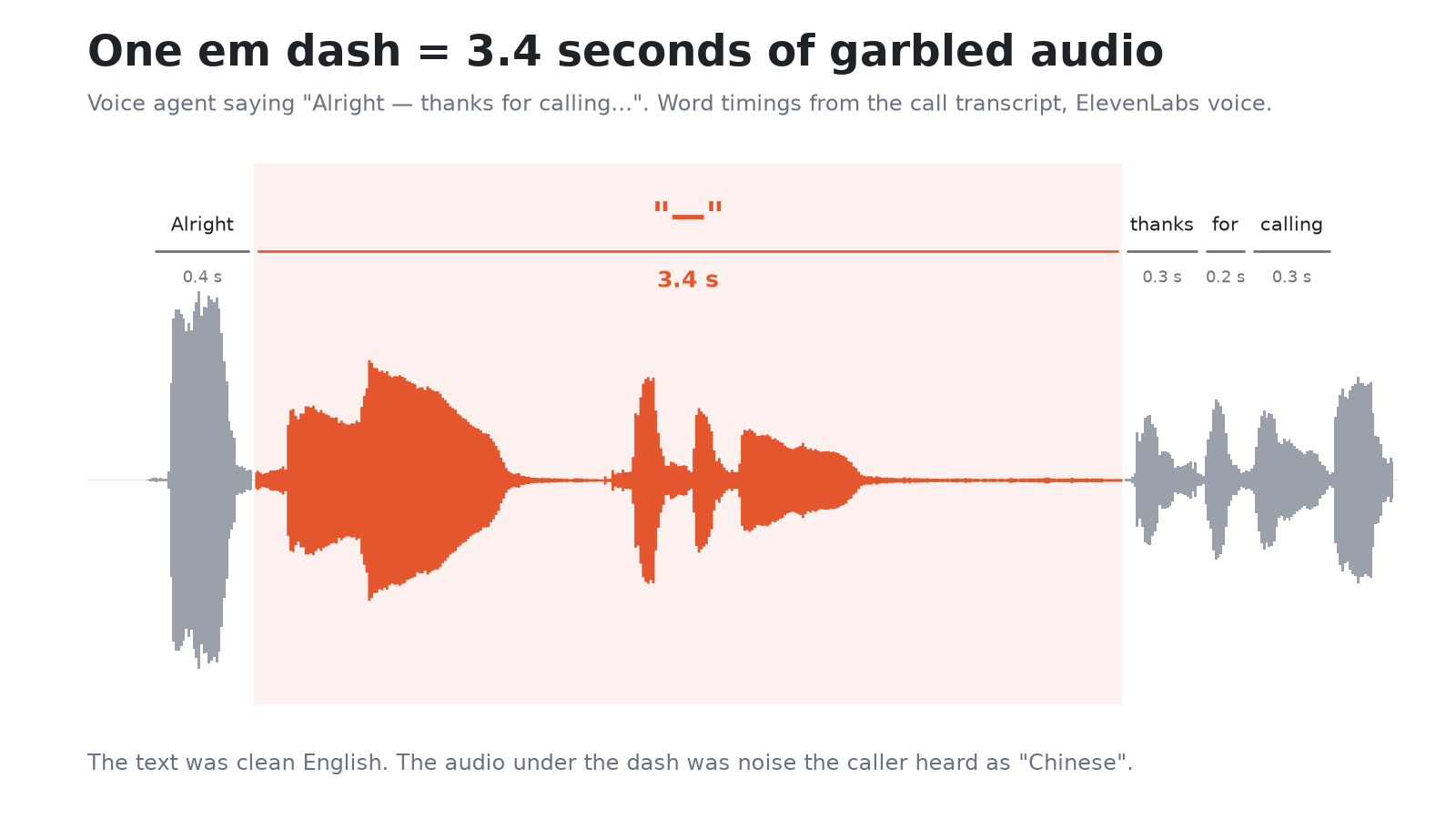
The proof is in the word timings that Retell stores with every call. "Alright" took 0.4 seconds. "Thanks" took 0.3, "for" took 0.2, "calling" took 0.3. The dash sat between them as its own token (the unit of text the voice engine reads) and took 3.4 seconds, about ten times longer than any real word in the sentence.
Why don't the transcripts and logs show the problem?
The transcript is the text the agent meant to say, so it reads perfectly. Every system that checks quality on text sees nothing wrong: the prompt (the written instructions the agent follows) is fine, the model's reply is fine, the tool calls (the agent looking up your calendar or CRM) succeed, and the call is logged as a success.
The failure lives one layer lower, where text becomes audio. Nobody reads the audio layer unless a caller complains, and most callers who hear gibberish from a business do not complain. They hang up and call the next company on the list. This is the same family of problem I wrote about in monitoring AI outputs instead of crashes: the system reports success while the customer gets something broken.
How do you find the em dash glitch in your call logs?
Check the word timings, not the transcript. In Retell the call object carries a list of words with start and end times. Any single word that lasts longer than 2.5 seconds is a red flag, because normal spoken words in these calls run 0.2 to 0.4 seconds. A dash, a long string of symbols or a raw piece of data read aloud will all show up as one "word" that lasts for seconds.
This check runs on every call automatically and needs no listening. It also works backwards: run it over the last month of calls and you see how many real customers heard the glitch before anyone noticed.
When I ran the same logic over older calls, the problem was not new. An earlier version of the agent had done the same thing days before on "Sorry [em dash] wrong number." It had been live in production the whole time.
Where do dashes come from in a voice agent?
From more places than the prompt. In this agent I found them in four:
- The prompt nodes. People write prompts the way they write emails, and language models copy the punctuation they are given.
- The model itself. Large language models love the em dash and will add one to a spoken reply even when the prompt has none.
- Fixed lines in tools. The short sentences an agent says while a tool runs ("let me check that for you") were written by hand, with dashes.
- Outside automation. Outbound callback calls started with a first line sent from the automation platform. In 14 of 15 of those lines there was a dash.
Cleaning only the prompt would have fixed one source out of four.
How do you fix it?
Four changes, all made through the API (the platform's direct connection for software, rather than its clicking screens) with a snapshot of the live agent saved before each one:
- Removed every dash from every node of the agent's conversation flow.
- Added a rule to the global prompt: no dashes when speaking, use a comma or a full stop instead. This covers dashes the model invents on its own.
- Rewrote the fixed tool lines without dashes.
- Added the same rule to the first line of outbound callbacks, which comes from outside the agent.
Then a real test call, and the word timings checked again instead of trusting the transcript. The tester called back twice on two versions of the agent. Both calls were clean, with no word longer than a normal word.
Was this caused by the platform migration?
No, and that matters for how you test. The glitch showed up during a migration, so the easy conclusion was "the new version is broken." The old version produced the same noise on the same kind of sentence. If I had rolled back, the bug would have stayed live and the migration would have taken the blame.
Every finding in a migration gets the same question: does the old version do it too? Simulated test calls answered that for the rest of the audit. The new agent passed 8 of 10 scenarios, and the old one failed the same 2 scenarios word for word. Those two failures live in the prompt, not in the move.
What else did the same voice agent audit find?
The dash was the loudest problem, not the only one.
- The agent read raw data aloud. When a tool returned a record, the agent sometimes read the data out as it came back, ZIP code and mobile number included. Fixed with a rule that the agent never reads out data it receives from a tool.
- The vendor's convert button produced an empty agent. The one-click conversion from the old agent type gave a template with 2 nodes and 0 tools. The real agent has 15 states and 16 custom tools. I recreated it in the new format with a script, then read the result back from Retell and compared it with the original: 0 differences before anything went live.
- Version numbers broke in automation. A callback workflow treated agent version 0 as "missing" and silently fell back to an old version. A one-line fix, and a bug nobody would have seen until callbacks started going to the wrong agent.
- Platform settings changed by themselves. The new agent came with voicemail hang-up, contact memory and a fixed timezone switched on by default. The old agent had all three off. Set back to match before any call reached it.
Phone numbers were moved one step at a time, each with a saved rollback file.
What is the Retell multi-prompt deadline?
If your voice agent is built as a Retell multi-prompt agent, it has a deadline. According to Retell's deprecation notice, from December 15, 2026 you cannot create new multi-prompt agents, and from February 1, 2027 you cannot edit them. After that Retell converts the remaining ones to conversation flow agents itself.
An agent that is converted for you, on the vendor's schedule, while it takes live calls, is exactly where problems like the ones above go unnoticed. Moving it yourself while the old agent still answers the phone gives you time to compare, test and switch numbers one by one.
Who should get an AI voice agent audit?
Any business where an AI receptionist or AI phone answering service books real jobs. Home service companies, clinics, law offices and agencies all fit, because a garbled sentence or a wrong booking costs a customer, not a log line. You need one most when:
- the agent was set up by an agency or a freelancer who has moved on, and nobody checks the calls;
- you are on Retell multi-prompt and need to move to conversation flow before the deadline;
- callers say the agent "sounds weird," hangs up, or repeats itself, and the transcripts look fine;
- bookings from the agent do not match what dispatch sees.
What I check: call audio against word timings, prompts and every fixed line the agent says, tools and the data they return, the automation around the agent (callbacks, CRM writes, webhooks, which are the automatic messages passed between systems), and the settings the platform switches on by default. Everything is done on your accounts, with a snapshot before each change and a rollback ready for each phone number.
What to do with this
If an AI agent answers your calls, have someone listen to a handful of real recordings every week, not only read transcripts, and ask whoever runs it whether word timings are being checked on every call. If your agent is a Retell multi-prompt agent, plan the move to conversation flow yourself before the December 15, 2026 and February 1, 2027 dates rather than letting it be converted for you while it takes live calls. When callers say the agent sounds odd or hangs up, treat it as lost jobs, because that is what it usually is.
The details of how I build and fix these systems are on the AI automation consultant page, and fixed prices are on pricing. If your voice agent is live and you are not sure what callers actually hear, start with a free written diagnostic.
Related:
- AI Receptionist for Small Business: A Buyer's Checklist
- LLM Observability: Monitor Outputs
- n8n Postgres Disk Full at 3 AM: How an AI Phone Bot Went Down and the Retention Settings That Prevent It
- Conversation Intelligence for Home Services: What to Build Before You Buy a Platform
- You Don't Have a Lead Problem. You Have a Conversion Problem You Can't See.